Efficient processing of customers credit and collections is easily accomplished with ERP's Accounts Receivable module.
Collection processing is made easier to ensure your critical cash flow.
Timely reviews and updates of customers provide essential information for your credit and collections department.
Some of the credit and collections tools offered by AR allow you to:
AR lets you associate customers into parent/child relationships so you can view the entire credit history for a customer.
The parent customer:
The AR module even allows a child customer's totals to roll into another customer.
Accounts Receivable uses an event monitor to constantly keep a watch on events that happen within the application and to request the necessary response from the needed personnel.
The event monitor employs user-defined rules for different categories of customers to control the workflow.
For example, if a customer's outstanding balance exceeds 80% of the credit limit for a high-risk customer, the event monitor can trigger a series of action items.
These action items could include:
The event monitor can automate many of the action items.
ERP's Accounts Receivable lets you quickly and efficiently close the workflow loop in order to get the cash into your organization.
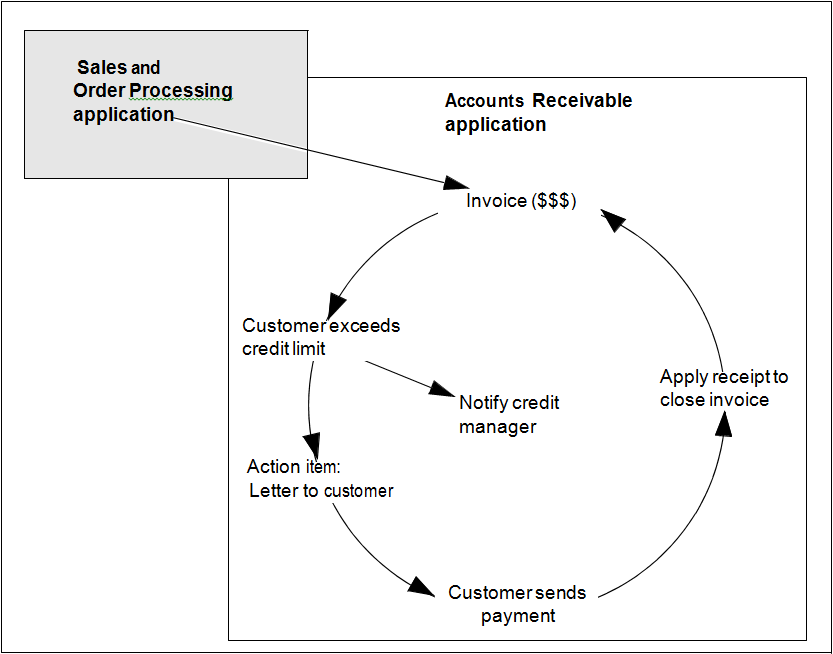
An invoice enters the AR application from an order entry/billing application.
The invoice causes the customer's balance to exceed its credit limit.
The event of exceeding the credit limit triggers an action item to notify the credit manager and sends a letter to the customer requesting payment.
The customer sends a payment and it is applied against the invoice.
Figure 1: Workflow of AR Invoices and Receipts
By automating the workflow, AR excels in retrieving the cash for your organization.
Accounts Receivable enables you to send dunning letters either:
The letters can be created within the AR module or exported to a PDF document.
For AR, a statement consists of a listing that contains all the customer's outstanding items.
In preparation for an automatic statement run, you can:
After selecting the customers, you can execute the statement run at any time.
You can accumulate statement runs and print any one or all when ready.
AR supports sending statements to a customer through email.